Set Up Your AI Toolkit
Two days of theory is enough. Today you get your hands dirty — because the only way to build an AI habit is to have a tool set up and actually use it. Total setup time: about two minutes.
There are dozens of AI tools out there — ChatGPT, Claude, Gemini, Perplexity, and more launching every week. Most people either pick one at random, try to learn all of them, or get overwhelmed and use none. All three approaches waste your time. Today you get a simpler plan.
The big three (and how to start)
Three major AI assistants cover almost everything: ChatGPT (OpenAI), Claude (Anthropic), and Gemini (Google). Here's everything a beginner needs to know:
They're all free to start. Every one has a free tier that's more than enough for this course. Paid plans run around $20 a month and mainly buy heavier usage and the newest models — skip them for now.
They're all similar at this level. Each works in a browser or a phone app, and each handles everything in Week 1 well. The differences matter to power users, not to you this week.
Setup is genuinely two minutes. Download the app or open the website, sign up with your email, type your first message. Done.
So which one? Pick one and stop deliberating. A sensible default: start with the one your life already orbits — Gemini if you live in Gmail and Google Docs, otherwise ChatGPT, since it's the one you'll hear about most. You can always add the others later.
The 60-second tool decision
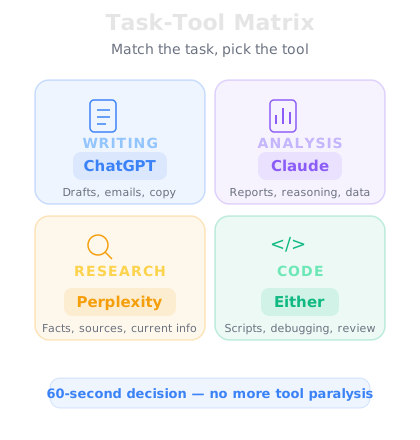
Once you're comfortable, a second question appears: "Is this the right tool for this task?" Skip the 14 conflicting blog posts. Think about what kind of task you're doing — nearly everything falls into four categories, each with a clear best fit:
Writing & drafting (emails, proposals, messages) → ChatGPT is the strongest all-around writer — tone, structure, and style.
Analysis & reasoning (reviewing documents, comparing options, finding flaws) → Claude excels at careful, nuanced thinking and handles long documents well.
Research & current facts (recent information, source-backed answers) → Perplexity searches the web in real time and cites its sources instead of relying on training data alone.
Coding & technical (spreadsheet formulas, scripts) → ChatGPT or Claude both handle it well.
That's the whole framework. Writing → ChatGPT. Analysis → Claude. Research → Perplexity. Code → either. Sixty seconds, no second-guessing — and don't stress the edge cases, because any of them will do a decent job of anything.
Your homework tonight
Don't let this stay theoretical. Tonight, send your new assistant one real task — each of these takes under two minutes:
1. The difficult email. "Rewrite this email so it's polite but firm, under 100 words: [paste your draft]."
2. The dinner plan. "Plan 5 weeknight dinners for [your household], budget [amount], under 30 minutes each. Include one shopping list."
3. The explainer. "Explain [something from your work or life] in plain language, then give me three questions to check I understood it."
One task, tonight. That single rep matters more than anything you read today.
Go deeper
The task-tool matrix comes from AI Productivity — a 10-day course that turns this toolkit into daily time savings: email, meetings, reading, decisions. Our AI for Parents course covers the family angle of the same setup. Both are great follow-ups after Day 28.
Tomorrow: the skill that multiplies everything else — prompts that actually work.