Your AI Toolkit for Finance
Before you can use AI to transform your finance workflows, you need the right tools set up and configured. The good news is that the most powerful AI tools are either free or have generous free tiers — and you can be up and running in under ten minutes.
Today you'll set up your core AI toolkit, understand what each tool does best, and learn the critical data privacy rules that every finance professional must follow when using AI.
The core tools you need
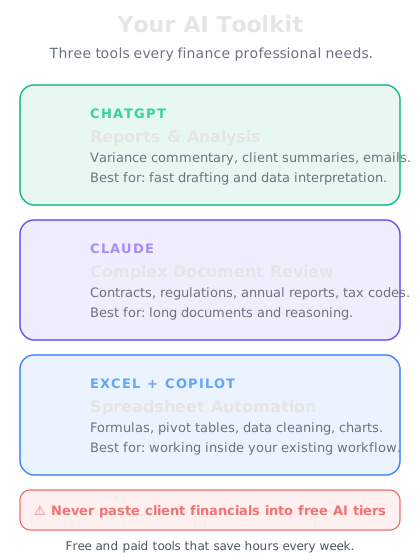
ChatGPT (OpenAI) — The most versatile general-purpose AI. Excellent for writing variance commentary, drafting reports, explaining accounting concepts, and analysing financial data you paste in. The free tier is powerful enough for most tasks. ChatGPT Plus adds file uploads and Advanced Data Analysis, which can process Excel files directly.
Claude (Anthropic) — Exceptionally strong at long-document analysis. If you need to review a 50-page contract, parse a lengthy set of financial statements, or analyse a complex regulatory document, Claude handles large contexts better than most alternatives. It's also excellent at nuanced, careful reasoning — useful for tax research and accounting judgement calls.
Microsoft Copilot in Excel — If your organisation uses Microsoft 365, Copilot can work directly inside your spreadsheets. Ask it to create formulas, build pivot tables, generate charts, and analyse data without leaving Excel. This is where AI meets your existing workflow.
Google Gemini — Integrated with Google Workspace, Gemini works inside Sheets, Docs, and Gmail. If your firm uses Google's ecosystem, this is your in-app AI assistant.
Which tool for which task
Not every tool is equally good at every task. Here's a practical guide:
| Task | Best Tool | Why |
|------|-----------|-----|
| Variance commentary | ChatGPT or Claude | Strong writing, understands financial context |
| Ratio analysis | ChatGPT with Advanced Data Analysis | Can calculate and chart directly |
| Long document review | Claude | Handles 100K+ token contexts |
| Excel formula help | Copilot in Excel | Works in your spreadsheet |
| Tax research | Claude or ChatGPT | Strong reasoning, but always verify |
| Email drafting | Any | All handle professional communication well |
| Data categorisation | ChatGPT | Good pattern matching on transaction data |
The key insight: you don't need to pick one. Most finance professionals settle into a pattern where they use two or three tools regularly, each for what it does best.
Data privacy — the non-negotiable rules
This is the most important section in today's lesson. Finance data is sensitive. Client data is confidential. Getting this wrong can end careers and trigger regulatory action.
Rule 1: Never paste client-identifiable data into free AI tools. Free tiers of ChatGPT and Claude may use your inputs for training. If you paste "John Smith's tax return shows income of £85,000," that data could theoretically appear in training data. Use anonymised data or paid enterprise tiers that guarantee data isn't used for training.
Rule 2: Check your firm's AI policy. Many accounting firms and financial institutions now have formal AI usage policies. Read yours. If your firm doesn't have one, raise it with your manager or compliance team.
Rule 3: Anonymise before you paste. Replace client names with "Client A." Replace specific identifying details. You can still get excellent analysis from anonymised data.
Rule 4: Use enterprise tiers for sensitive work. ChatGPT Enterprise, Claude for Business, and Microsoft Copilot all offer data privacy guarantees. The cost is trivial compared to a data breach.
Rule 5: Never rely on AI output without verification. AI can hallucinate numbers, invent tax codes, and misstate regulations. Every output must be reviewed by a qualified professional before it reaches a client or decision-maker.
Your 10-minute setup checklist
Here's exactly what to do right now:
1. Create a ChatGPT account at chat.openai.com — free tier is fine to start
2. Create a Claude account at claude.ai — free tier gives you solid access
3. Check if your organisation has Microsoft Copilot — ask your IT team
4. Read your firm's AI policy — if one exists, bookmark it
5. Create an "AI Prompts" folder — in your notes app or file system, start saving prompts that work well
That's it. You now have the tools you need for the rest of this course. Tomorrow you'll use them to run your first real financial analysis.