Day 5 of 20 · AI for HR
Week 1 Recap & Foundation
⏱ 3 min
📊 Beginner
You've covered a lot of ground this week. Before we move into more advanced territory, let's solidify what you've learned. This recap isn't just a summary — it's a chance to connect the dots between the tools, techniques, and mindsets you've picked up in days 1 through 4.
If any of these concepts feel fuzzy, go back and revisit that lesson before moving on. A strong foundation makes everything that follows easier.
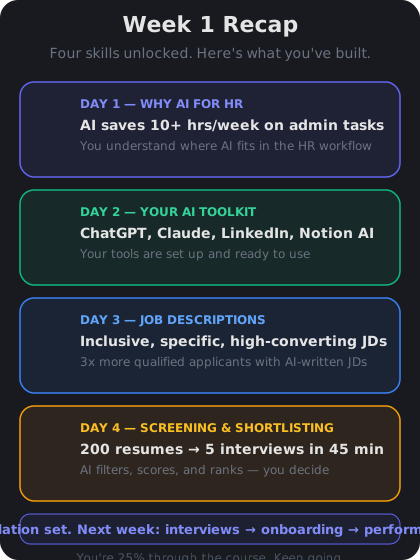
Your first week built four foundational skills: understanding AI in HR, choosing tools, writing JDs, and screening candidates.
What you learned this week
Day 1 — Why AI is transforming HR. AI automates repetitive text-heavy tasks so you can focus on strategic, human-centered work. It's a tool, not a replacement. It has clear limits around judgment, empathy, bias, and legal compliance.
Day 2 — Your AI toolkit. The core toolkit is simple: a writing assistant (ChatGPT or Claude) for drafting, a sourcing tool (LinkedIn Recruiter) for candidates, and your workspace AI (Notion, Google, or Microsoft) for organizing. Start small and expand only when needed.
Day 3 — Writing job descriptions. Great JDs separate requirements from nice-to-haves, use inclusive language, and are specific about the role. AI helps you draft faster and audit for bias — but you still need to provide the context.
Day 4 — Screening and shortlisting. Build a rubric before you screen. Use AI to sort candidates into match categories, not to make final decisions. Always review a sample of "possible match" candidates to catch what AI might miss.
The principles to carry forward
Three principles emerged this week that apply to everything you'll learn going forward:
1. AI drafts, you decide. Every AI output is a first draft. Your job is to review, refine, and approve. This applies to job descriptions, screening decisions, and every other task we'll cover.
2. Context in, quality out. The more specific your prompts — role details, company context, audience — the better AI performs. Vague inputs produce generic outputs.
3. Check for bias at every step. From job description language to resume screening criteria, bias can enter at any point. Make bias review a standard part of your workflow, not an afterthought.
Knowledge Check
What is the most important principle when using AI in HR?
A
Always use the most expensive AI tool for the best results
B
Use AI only for tasks that don't involve candidate data
C
Let AI handle all decision-making to remove human bias
D
Treat AI outputs as first drafts that require human review and judgment
The "AI drafts, you decide" principle is foundational. AI produces strong first drafts quickly, but human review is essential — especially in HR, where decisions affect people's careers and livelihoods.
Knowledge Check
Which combination represents the core AI toolkit for HR?
A
A writing assistant, a sourcing tool, and your workspace AI
B
A resume parser, an interview scheduler, and a background check tool
C
An applicant tracking system, a payroll AI, and a chatbot builder
D
A video editor, a project management tool, and a spreadsheet AI
The core toolkit is a writing assistant (ChatGPT/Claude) for drafting, a sourcing tool (LinkedIn Recruiter) for finding candidates, and your workspace AI (Notion/Google/Microsoft) for organizing. These three cover 90% of daily HR AI needs.
Knowledge Check
Why should you review "possible match" candidates after AI screening, not just "strong matches"?
A
Because AI always puts the best candidates in the possible match category
B
Because AI may miss qualified candidates with non-traditional backgrounds or career paths
C
Because reviewing more candidates improves your company's diversity metrics
D
Because possible match candidates are willing to accept lower salaries
AI screening can undervalue candidates with non-traditional backgrounds, career transitions, or unconventional resume formats. Reviewing a sample of possible matches helps you catch strong candidates that the AI's pattern-matching missed.
I just finished my first week learning about AI for HR. Can you give me three specific things I should try this week to practice what I've learned?
Here are three practical exercises for this week:
**1. Rewrite one existing job description (30 min)**
Pick a JD your team posted recently. Paste it into ChatGPT or Claude and ask it to: separate requirements from nice-to-haves, audit for inclusive language, and tighten the copy. Compare the before and after.
**2. Build a screening rubric for an open role (20 min)**
Take a current job posting and ask AI to create a 5-criteria scoring rubric with 3-point scales. Then test it by scoring 5 real resumes. See if the rubric matches your gut instinct — if not, refine the criteria.
**3. Set up your toolkit (15 min)**
If you haven't already, create a free ChatGPT or Claude account. Save 3 prompt templates: one for job descriptions, one for screening rubrics, and one for email drafts. Having templates ready removes the friction of starting from scratch each time.
↻ Replay conversation
👥
Day 5 Complete
"AI drafts, you decide. Context drives quality. Check for bias at every step. These principles guide everything ahead."
Tomorrow — Day 6
Interview Question Design
Learn how to use AI to design structured behavioural interview questions, competency frameworks, and scoring rubrics.