Your AI Toolkit for Product Development
Yesterday you saw how AI compresses months of product research into days. Today you're going to set up the tools that make it happen.
You don't need expensive product management software, research databases, or a team of analysts. Three free AI tools — configured properly — will give you research capabilities that rival teams ten times your size. The secret isn't just having the tools. It's knowing how to set them up for product work specifically.
By the end of today, your toolkit will be ready and tuned for product development. Tomorrow, you start generating ideas.
The big three — and what each one does best
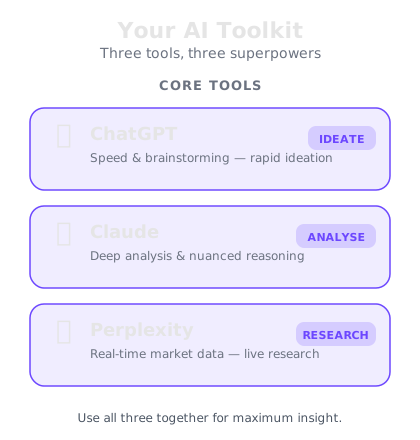
You'll use three AI tools throughout this course. Each has a free tier that's more than enough, and each excels at different parts of the product development process.
ChatGPT — Your brainstorming and analysis engine. ChatGPT is exceptional at generating ideas, role-playing as customers, writing positioning statements, and stress-testing assumptions. When you need volume — 20 product name ideas, 10 feature descriptions, 5 customer persona variations — ChatGPT is where you go. It thinks fast and wide. The free plan gives you generous daily access to GPT-5.2 Instant.
Claude — Your deep research and strategy partner. Claude excels at long, structured analysis. When you need to process a wall of competitor data, write a detailed product requirements document, or build a comprehensive go-to-market plan, Claude produces the most thorough, well-organised output. It's also the best at following complex, multi-step instructions without losing the plot. The free tier provides solid daily usage.
Perplexity — Your real-time market intelligence tool. Unlike ChatGPT and Claude, Perplexity searches the live web and cites its sources. Use it when you need current data — market sizes, trending products, competitor pricing, recent news, and industry reports. It's the difference between informed decisions and guesswork. The free tier gives you ample daily searches.
Setting up custom instructions for product work
Here's where most people go wrong with AI tools: they use them out of the box. That's like buying a professional camera and leaving it on auto mode. It works, but you're leaving 80% of the value on the table.
Custom instructions tell the AI who you are, what you're working on, and how you want responses structured. They run in the background of every conversation, so you don't have to repeat context every time.
For ChatGPT — go to Settings, then Personalisation, then Custom Instructions:
In "What would you like ChatGPT to know about you?" write something like:
I'm a product developer working on [your industry/focus]. I need practical, actionable analysis — not generic advice. When I ask for ideas, give me specific, concrete suggestions with reasoning. When I ask you to role-play as a customer, commit to the character fully and give honest reactions, including negative ones.
In "How would you like ChatGPT to respond?" write:
Be direct and specific. Use British English. Skip disclaimers and caveats — I know AI has limitations. Structure long responses with clear headings. When analysing an idea, always include the strongest argument against it.
For Claude — use the system prompt at the start of each project:
Claude doesn't have persistent custom instructions in the same way, but you can create a saved prompt that you paste at the start of each new conversation. Include your product context, preferred response style, and any frameworks you want Claude to use consistently.
Your product development workspace
Beyond the AI tools, you need a simple system to capture and organise what they produce. Don't overcomplicate this. You need three things:
An idea capture document. A single document — Google Doc, Notion page, or even a text file — where every AI-generated idea, insight, and analysis goes. Date each entry. You'll be amazed how often an idea that seemed mediocre on Tuesday looks brilliant on Friday when you've gathered more context.
A prompt library. As you work through this course, you'll develop prompts that work brilliantly for specific tasks — competitor analysis, persona creation, feature prioritisation. Save these. A prompt you spent 20 minutes refining shouldn't be rewritten from scratch next time.
A decision log. When AI gives you analysis that leads to a decision — "we should target this market" or "we should drop this feature" — write down the reasoning. Two months from now, you'll want to know why you made that call, and having the AI's analysis alongside your decision is invaluable.
When to use which tool — your cheat sheet
Here's the reference you'll come back to throughout this course:
Use ChatGPT when you need:
- Brainstorming sessions (product names, features, positioning angles)
- Customer persona role-play and assumption testing
- Quick competitive comparisons
- Writing product copy, pitch decks, and landing page content
- Generating multiple variations to compare
Use Claude when you need:
- Detailed product requirements documents
- Comprehensive market analysis with structured output
- Long-form strategy documents and business plans
- Processing large amounts of competitor data
- Complex multi-step analysis that requires maintaining context
Use Perplexity when you need:
- Current market sizes and growth rates
- Competitor pricing and recent product launches
- Trending technologies and consumer behaviours
- Industry reports and analyst opinions
- Validation of claims with cited sources
The golden rule: Start with Perplexity for facts, move to Claude for analysis, and use ChatGPT for creative exploration. Research, then analyse, then brainstorm.
Setting up your accounts
This takes about 10 minutes. Do it now before moving on:
Step 1 — ChatGPT. Go to chat.openai.com and create a free account. Once you're in, head to Settings and set up the custom instructions we covered above. The free plan gives you access to GPT-5.2 Instant — more than capable for product work.
Step 2 — Claude. Go to claude.ai and create a free account. Save your product development system prompt somewhere you can quickly paste it when starting new conversations. Claude's free tier gives you generous daily usage.
Step 3 — Perplexity. Go to perplexity.ai and create a free account. The free tier gives you solid daily search capability for research tasks.
Step 4 — Create your workspace. Open a new document and create three sections: Idea Capture, Prompt Library, and Decision Log. Bookmark it. This is your product development headquarters.
Three accounts and a document. That's your entire product development infrastructure. Total cost: nothing. Total capability: extraordinary.