Never Waste Another Meeting
The average professional spends 23 hours per week in meetings. Most of those meetings are poorly prepared, loosely run, and badly followed up on. You leave with a vague sense of what was discussed, a few scribbled notes, and a nagging feeling that half of it could have been an email.
AI cannot eliminate meetings. But it can make every single one count. Today you will learn how to use AI across all three phases of a meeting -- before, during, and after -- so that preparation takes minutes instead of hours, nothing important gets lost, and every meeting ends with clear, assigned action items.
Before -- preparation that takes five minutes
Most people walk into meetings cold. They skim the agenda (if there is one) and hope they can keep up. AI changes this by turning preparation from a chore into a five-minute task.
Generate a focused agenda. Tell AI who is attending, what the meeting is about, and what decisions need to be made. It will produce a structured agenda with time allocations and discussion prompts. Share it with attendees beforehand, and your meeting is already more productive than 90% of meetings that happen without one.
Build a prep brief from past documents. Have notes from previous meetings on the same topic? A project plan? An old email thread? Paste them into AI and ask for a "pre-meeting brief" -- a one-page summary of where things stand, what was last decided, and what open questions remain. You walk in fully caught up in two minutes.
Prepare your talking points. If you need to present an update or make a case for something, give AI your rough thoughts and ask it to organize them into a concise, persuasive set of talking points. No more scrambling to organize your thoughts five minutes before the call starts.
During -- capture everything without losing focus
The biggest problem during meetings is the impossible choice between participating and note-taking. If you are scribbling notes, you are not fully engaged in the conversation. If you are fully engaged, you miss details.
AI transcription tools solve this completely. Services like Otter.ai, Fireflies.ai, and the built-in AI features in Zoom and Microsoft Teams can record, transcribe, and summarize meetings in real time.
Live transcription captures every word so you never have to worry about missing something. Just be present and contribute.
Speaker identification tags who said what, which is critical when you need to know who committed to a deliverable.
Structured notes in real time. Even if you cannot record the meeting, you can take rough, messy notes during the call and hand them to AI immediately afterward. Short phrases and abbreviations are fine -- AI will expand and organize them.
One important note: always inform attendees that the meeting is being recorded and transcribed. Transparency is not just polite -- in many jurisdictions, it is legally required.
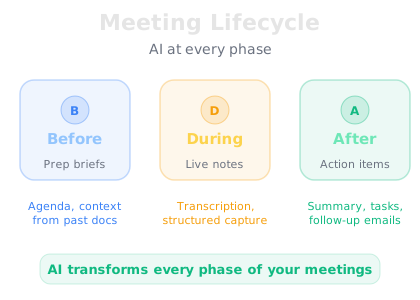
After -- summaries and action items in seconds
This is where AI delivers the biggest time savings. Instead of spending 20 minutes writing up meeting notes and chasing people for their commitments, you hand the transcript to AI and get everything in seconds.
Meeting summary. A concise overview of what was discussed, organized by topic. This replaces the email you used to spend 15 minutes writing.
Action items with owners and deadlines. A clear list of who committed to doing what, and by when. This is the single most valuable output -- accountability breaks down when action items live only in people's memories.
Key decisions. A record of what was decided, which prevents the all-too-common "I thought we agreed on something different" conversations two weeks later.
Follow-up emails. A ready-to-send email summarizing the meeting for attendees and stakeholders who could not attend. AI can even tailor different versions for different audiences -- a detailed one for the team and a high-level one for leadership.
Dependency mapping. AI can identify which action items depend on other action items, flagging potential bottlenecks before they become problems. If Sarah's deliverable depends on data from Marcus, AI will surface that connection.
Making the habit stick
The three-phase approach works best when it becomes automatic. Here is how to build the habit without adding friction:
Start with "after" only. If adopting all three phases at once feels like too much, start with just the post-meeting summary. After your next meeting, paste your notes or transcript into AI and ask for a summary with action items. Once you see how much time this saves, the other phases will follow naturally.
Create a reusable prompt. Write one prompt template for meeting summaries that you can paste and reuse every time. Something like: "Summarize this meeting transcript. Organize by topic. Extract all action items with owners and deadlines. Flag any dependencies between action items." Save it somewhere accessible and use it after every meeting.
Send the summary immediately. The faster you share the summary and action items after a meeting, the more likely people are to follow through. AI lets you send it within minutes of the meeting ending -- while the conversation is still fresh in everyone's mind.