Pick the Right AI Tool in 60 Seconds
Yesterday you saw how AI can reclaim hours of your workday. Today, we solve the first obstacle most people hit: "Which AI tool should I actually use?"
There are dozens of AI tools out there — ChatGPT, Claude, Gemini, Perplexity, Copilot, and more launching every week. Most people either pick one at random, try to learn all of them, or get overwhelmed and use none. All three approaches waste your time.
You don't need to master every tool. You need a simple framework for matching the right tool to the right task — in about 60 seconds.
The tool paralysis problem
Here's a scene that plays out every day: you need to write a proposal. You open ChatGPT. Then you wonder if Claude would be better. You Google "best AI for writing proposals" and find 14 conflicting blog posts. Twenty minutes later, you haven't written a single word.
Tool paralysis is a real productivity killer. The irony is brutal — the tools designed to save you time end up costing you time because you can't decide which one to use.
The fix isn't more research. It's a decision framework you can memorize in two minutes and apply forever.
The Task-Tool Matrix
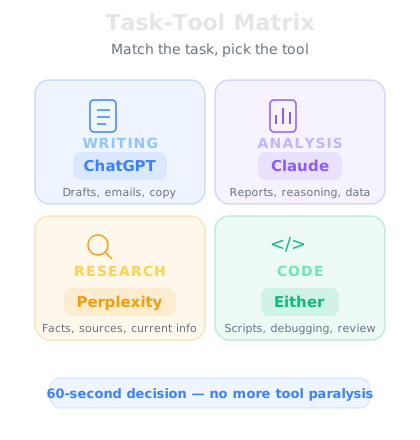
Instead of thinking about tools, start by thinking about what kind of task you're doing. Every knowledge work task falls into one of four categories, and each category has a clear best-fit tool:
Writing & Drafting (emails, proposals, copy, messages) → ChatGPT is the strongest all-around writer. It handles tone, structure, and style better than most alternatives. The free tier is enough for most writing tasks.
Analysis & Reasoning (reviewing documents, comparing options, finding flaws) → Claude excels at careful, nuanced thinking. It handles long documents, follows complex instructions, and is less likely to skip important details.
Research & Facts (current information, source-backed answers, market data) → Perplexity searches the web in real time and cites its sources. Unlike ChatGPT or Claude, it doesn't rely on training data alone — it actually looks things up.
Coding & Technical (spreadsheet formulas, scripts, automations) → ChatGPT or Claude both handle code well. For quick formulas, either works. For complex logic, Claude tends to be more careful.
That's it. Writing → ChatGPT. Analysis → Claude. Research → Perplexity. Code → either. You just saved yourself 20 minutes of second-guessing.
Free vs. paid — when to upgrade
Every major AI tool has a free tier, and for most people starting out, free is enough. Here's when it makes sense to pay:
Upgrade ChatGPT ($20/month) if you use it more than 5 times a day. The paid version is faster, handles longer content, and gives you access to the latest model.
Upgrade Claude ($20/month) if you work with long documents regularly — contracts, reports, research papers. Claude's paid tier handles much larger files and longer conversations.
Upgrade Perplexity ($20/month) if research is a core part of your job. The paid version gives you more searches and access to more powerful models.
The rule of thumb: If a tool saves you more than 30 minutes a week, the $20/month pays for itself many times over. Start free, track your usage, and upgrade when the math is obvious.