Linux Survival Guide
You are logged into your server via SSH. Now what? Your VPS runs Ubuntu Linux, and there is no graphical interface — just a blinking cursor waiting for commands. That can feel intimidating, but you only need about ten commands to manage your server confidently. This lesson teaches every one of them.
Navigating the Filesystem
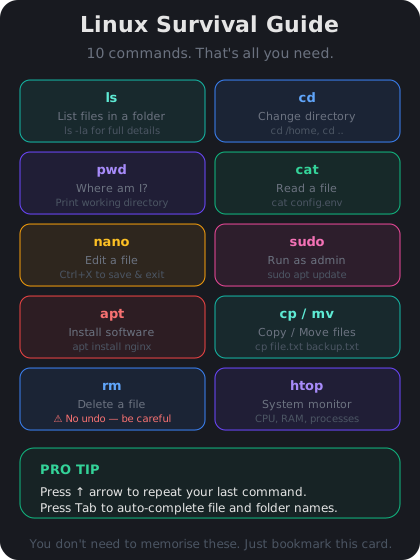
Your server's files are organized in a tree starting at `/` (called "root"). Here are the commands you need to move around:
- `pwd` — Print Working Directory. Shows where you are right now.
- `ls` — List files and folders in the current directory. Add `-la` to see hidden files and details: `ls -la`.
- `cd` — Change Directory. Use `cd /home` to go to the home folder, or `cd ..` to go up one level.
- `cat` — Display the contents of a file. Example: `cat /etc/hostname` shows your server's name.
Try this now: run `pwd`, then `ls -la`, then `cd /var` and run `ls` again. You are exploring your server's filesystem.
Editing Files and Installing Software
- `nano` — A simple text editor that runs in your terminal. Open a file with `nano filename.txt`, make changes, then press Ctrl+O to save and Ctrl+X to exit.
- `sudo` — Run a command with administrator privileges. Many commands need this. Example: `sudo nano /etc/ssh/sshd_config`.
- `apt update` — Refresh the list of available software packages.
- `apt install` — Install new software. Example: `sudo apt install curl` installs the curl download tool.
- `apt upgrade` — Update all installed software to the latest versions.
A common pattern you will use often: `sudo apt update && sudo apt upgrade -y`. This refreshes the package list and installs all available updates in one go. The `-y` flag automatically answers "yes" to confirmation prompts.