Why Self-Host OpenClaw?
OpenClaw is an open-source AI agent framework with over 190K GitHub stars. It gives AI "hands" — connecting it to your email, calendar, files, code, Slack, and more. But here is the thing: if OpenClaw only runs when your laptop is open, it can only help you while you are sitting at your desk. Self-hosting changes everything.
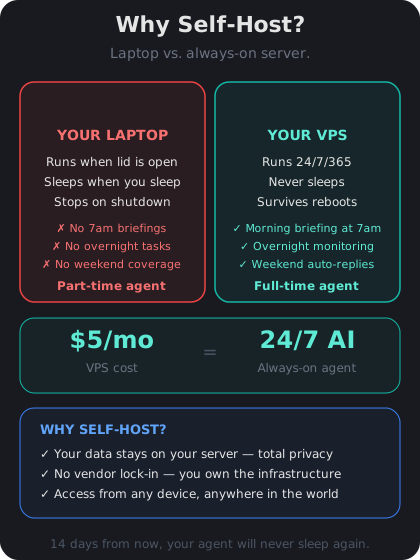
Laptop vs. Server — What Actually Changes
When you run OpenClaw on your laptop, it stops the moment you close the lid. Your automations pause, scheduled tasks fail, and anything that depends on a constant connection breaks. A VPS (Virtual Private Server) is a small computer in a data center that stays on 24 hours a day, 7 days a week. Here is what changes when you move OpenClaw there:
- Always-on automations — your agent can triage emails at 3 AM, post Slack summaries every morning, or back up files on a schedule without you lifting a finger.
- Privacy and control — your data stays on your server, not on a third-party platform. You decide what gets stored and who can access it.
- Reliability — data centers have redundant power and internet. Your home Wi-Fi going down will not take your agent offline.
Think of it like upgrading from a desk lamp to a streetlight. Same type of light, but one of them works even when you are not home.
What OpenClaw Can Do on a Server
Once OpenClaw is running 24/7, the possibilities open up dramatically. Here are a few examples of what people use it for:
- Morning briefings — your agent reads your calendar, checks the weather, and sends you a summary on Slack before you wake up.
- Email triage — it scans incoming mail, labels urgent messages, drafts replies to routine ones, and flags anything that needs your attention.
- Code monitoring — it watches your GitHub repos, summarizes new pull requests, and alerts you to failing CI builds.
These workflows are impossible on a laptop that sleeps eight hours a night. A VPS makes them effortless.
What You Will Need (Don't Worry, It's Simple)
By the end of this course you will have a working OpenClaw instance on your own server. You do not need any DevOps experience. Here is a quick preview of what the journey looks like:
1. Pick a VPS provider and create a tiny cloud server (~$5/month).
2. Connect to it using SSH (we will explain every step).
3. Install OpenClaw using Docker (a tool that bundles everything for you).
4. Secure it so only you can access your agent.
The total monthly cost is about the price of a fancy coffee. And you get a personal AI assistant that never clocks out.