Day 4 of 20 · AI for HR
Screening & Shortlisting with AI
⏱ 6 min
📊 Beginner
You've posted a great job description and now you have 200 applications sitting in your inbox. Screening them manually takes hours — and after the first 50, your judgment starts to slip. AI can help you build a structured screening process that's faster, more consistent, and less prone to the fatigue-driven bias that creeps in during manual review.
Today you'll learn how to use AI to create screening criteria, build shortlisting frameworks, and stay aware of the bias risks that come with automated screening.
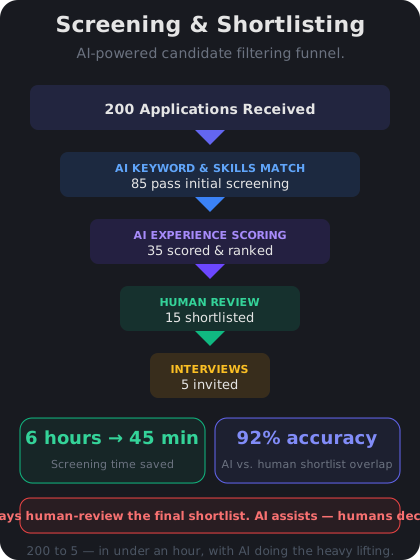
A structured screening process helps you move from hundreds of applications to a strong shortlist efficiently.
Building screening criteria with AI
Before you screen a single resume, you need clear criteria. Vague criteria like "strong candidate" lead to inconsistent decisions. AI can help you turn a job description into a structured scoring rubric.
Prompt: "Based on this job description, create a resume screening rubric with 5 criteria. For each criterion, define what a strong match (3 points), partial match (2 points), and weak match (1 point) looks like."
Example criteria for a Marketing Manager role:
- Relevant experience — 3 pts: 5+ years in B2B marketing; 2 pts: 3-5 years or adjacent experience; 1 pt: less than 3 years
- Technical skills — 3 pts: proficient in required tools; 2 pts: experience with similar tools; 1 pt: no relevant tools listed
- Leadership — 3 pts: managed a team of 3+; 2 pts: led projects but no direct reports; 1 pt: no leadership evidence
A rubric like this keeps your screening consistent whether you're reviewing the first resume or the 150th.
Knowledge Check
Why should you create a screening rubric before reviewing resumes?
A
Because clear criteria ensure consistent evaluation across all candidates, reducing fatigue-driven bias
B
Because rubrics are legally required for all hiring processes
C
Because applicant tracking systems require a rubric to function
D
Because AI cannot screen resumes without a predefined rubric
Without clear criteria, screening quality degrades as reviewers get tired. A rubric ensures every candidate is evaluated against the same standards, whether they're first in the pile or last. This reduces inconsistency and fatigue-driven bias.
Using AI to assist with resume review
AI can help you process resumes faster, but you need to use it carefully. Here's a practical approach:
What AI can do well:
- Extract key information from resumes (years of experience, skills, education)
- Compare resume content against your screening rubric
- Flag gaps or inconsistencies for your review
- Summarize long resumes into key bullet points
What you should never automate fully:
- Final accept/reject decisions — always have a human make the call
- Evaluating cultural fit or soft skills from a resume
- Screening out candidates based on employment gaps without context
A safe workflow: Use AI to sort candidates into three buckets — "strong match," "possible match," and "unlikely match." Then personally review the strong matches and a random sample of possible matches. This gives you speed without sacrificing quality.
I have a screening rubric with 5 criteria for a Senior Data Analyst role. Here are three candidate summaries. Can you score each one against the rubric and explain your reasoning?
I'll score each candidate against your 5 criteria (max 15 points):
**Candidate A — 13/15**
- SQL proficiency: 3/3 — 6 years of daily SQL use, complex queries
- Visualization tools: 3/3 — Tableau expert, built executive dashboards
- Statistical analysis: 2/3 — some experience but no advanced modeling
- Stakeholder communication: 3/3 — presented to C-suite regularly
- Industry experience: 2/3 — adjacent industry, transferable context
**Candidate B — 9/15**
- SQL proficiency: 2/3 — intermediate, mostly SELECT queries
- Visualization tools: 2/3 — Power BI experience, no Tableau
- Statistical analysis: 1/3 — basic descriptive stats only
- Stakeholder communication: 2/3 — team-level presentations
- Industry experience: 2/3 — same industry, different function
**Candidate C — 11/15**
- SQL proficiency: 3/3 — advanced, wrote stored procedures
- Visualization tools: 1/3 — limited to Excel charts
- Statistical analysis: 3/3 — built predictive models
- Stakeholder communication: 2/3 — mostly written reports
- Industry experience: 2/3 — related industry
Recommendation: Candidate A is a strong match. Candidate C has technical depth worth exploring. Candidate B may need development in key areas.
↻ Replay conversation
Knowledge Check
What is the safest way to use AI for resume screening?
A
Use AI to make all screening decisions to eliminate human bias
B
Let AI automatically reject candidates below a score threshold
C
Use AI to sort candidates into match categories, then have humans review the results
D
Only use AI to screen candidates from underrepresented backgrounds
The safest approach is using AI as a sorting tool, not a decision-maker. AI can categorize candidates by match strength, but humans should make final screening decisions — especially since AI can miss context that matters, like career transitions or non-traditional backgrounds.
Knowledge Check
What is a key risk of fully automating resume screening with AI?
A
AI may screen out qualified candidates based on patterns that reflect historical bias
B
AI cannot read PDF resume formats
C
AI always favors candidates with longer resumes
D
AI screening takes longer than manual screening
AI models learn from historical data, which may contain bias. Fully automated screening can systematically disadvantage candidates from non-traditional backgrounds, with employment gaps, or whose resumes don't match patterns the AI was trained on. Human oversight is essential.
👥
Day 4 Complete
"Use AI to build screening rubrics and sort candidates efficiently — but always keep a human in the final decision loop."
Tomorrow — Day 5
Week 1 Recap & Foundation
Review everything you learned in days 1-4 and solidify your foundation before diving into more advanced HR applications.