Day 1 of 20 · AI for HR
Why AI Is Transforming HR
⏱ 4 min
📊 Beginner
HR teams are drowning in repetitive work. Screening hundreds of resumes, writing job descriptions, scheduling interviews, drafting policies, managing onboarding checklists — these tasks consume hours every week. AI is changing that by automating the predictable parts so you can focus on the human parts: culture, relationships, and strategic decisions.
This isn't about replacing HR professionals. It's about giving you back 20-30% of your week so you can do the work that actually requires a human touch.
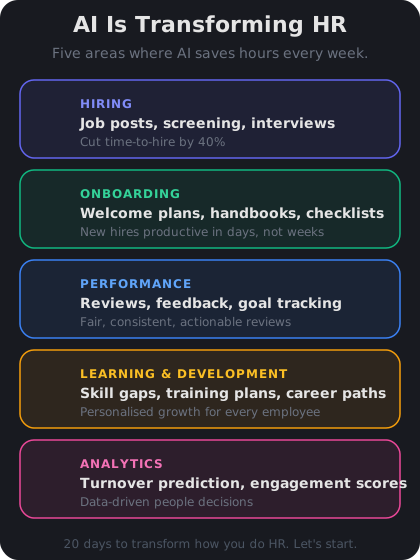
AI can assist at every stage of the employee lifecycle, from first contact to exit interview.
Where AI saves the most time in HR
The biggest time sinks in HR are repetitive, text-heavy tasks. These are exactly where AI excels:
Recruiting and hiring. Writing job descriptions, screening resumes, generating interview questions, and drafting offer letters. AI can produce a first draft of a job description in 30 seconds that would take you 45 minutes.
Onboarding and documentation. Welcome emails, 30-60-90 day plans, employee handbooks, and policy documents. Instead of copying and adapting templates manually, AI generates customized versions instantly.
People operations. Performance review templates, feedback summaries, training plans, and internal communications. AI handles the structure so you can focus on the substance.
Compliance and policy. Drafting policy language, checking for inclusive terminology, and ensuring consistency across documents. AI catches things humans miss when they're tired or rushed.
Knowledge Check
What is the primary benefit of AI for HR professionals?
A
AI eliminates the need for employee handbooks and policies
B
AI replaces the need for HR departments entirely
C
AI makes all hiring decisions more accurate than humans
D
AI automates repetitive tasks so HR can focus on strategic, human-centered work
AI handles the repetitive, text-heavy tasks that consume HR professionals' time — drafting, screening, formatting — freeing them to focus on culture, relationships, and strategic decisions that require human judgment.
What AI cannot do in HR
AI is a powerful tool, but it has clear limits in HR. Understanding these limits is just as important as knowing its strengths.
AI cannot make final hiring decisions. It can rank resumes and flag strong candidates, but the human judgment call — culture fit, team dynamics, growth potential — must stay with you.
AI cannot replace empathy. Difficult conversations, performance coaching, conflict resolution, and supporting employees through personal challenges require emotional intelligence that AI simply does not have.
AI can introduce bias. If your prompts or training data carry bias, AI will amplify it. You need to review AI outputs critically, especially in recruiting and performance management.
AI cannot guarantee legal compliance. It can draft policy language, but a qualified employment lawyer must review anything that carries legal weight.
Knowledge Check
Why should HR professionals review AI-generated recruiting content carefully?
A
Because AI-generated content is not legally permitted in job postings
B
Because AI cannot write in a professional tone
C
Because AI can introduce or amplify bias from its training data or your prompts
D
Because AI always produces grammatically incorrect text
AI models can reflect and amplify biases present in their training data or in the way prompts are written. HR professionals must review AI outputs critically, especially for recruiting content, to ensure fairness and inclusivity.
I'm an HR manager at a 200-person company. I spend about 15 hours a week on admin tasks like writing job posts, updating policies, and drafting emails. Where should I start with AI?
Great question. For a 200-person company, I'd start with the three tasks that give you the fastest return:
**1. Job descriptions (save ~3 hrs/week)**
Paste your current JD template and ask AI to rewrite it for each new role. Include the title, key responsibilities, and must-have qualifications. You'll get a polished draft in seconds.
**2. Email templates (save ~2 hrs/week)**
Offer letters, rejection emails, onboarding welcome messages — create a prompt for each type and reuse it. Customize the details, let AI handle the structure.
**3. Policy updates (save ~2 hrs/week)**
When you need to update a policy section, paste the current version and describe the change. AI will rewrite it in consistent language.
That's roughly 7 hours back per week — almost a full day. Start with these, get comfortable, then expand to interview questions and performance reviews.
↻ Replay conversation
Knowledge Check
Which HR task is typically the best starting point for AI adoption?
A
Making final compensation decisions
B
Mediating workplace conflicts
C
Conducting employee terminations
D
Drafting job descriptions and email templates
Text-heavy, repetitive tasks like drafting job descriptions and email templates are ideal starting points for AI. They're low-risk, high-frequency, and produce immediate time savings that build confidence with the technology.
👥
Day 1 Complete
"AI gives HR professionals back hours every week by handling repetitive text work — start with job posts, emails, and policies."
Tomorrow — Day 2
Your AI Toolkit for HR
Discover the essential AI tools every HR professional should know — from ChatGPT and Claude to LinkedIn Recruiter and Notion AI.