Day 2 of 20 · AI for HR
Your AI Toolkit for HR
⏱ 5 min
📊 Beginner
You don't need a dozen AI tools to transform your HR workflow. A small, well-chosen toolkit covers 90% of what you'll need. Today we'll walk through the core AI tools that HR professionals are using right now — what each one does best, and how they fit together in your daily work.
The goal isn't to use every tool available. It's to pick the right tool for each task and build a reliable workflow around it.
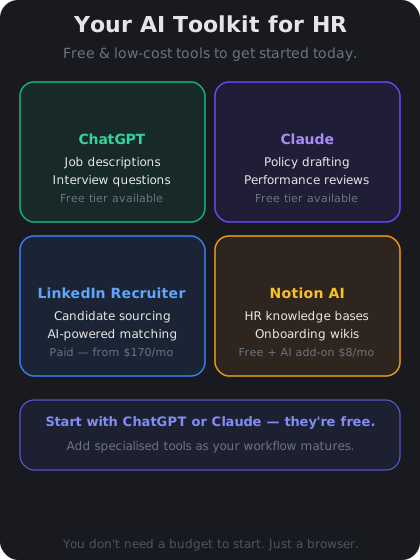
Each tool has a strength. The best HR teams use them together.
ChatGPT and Claude — your writing workhorses
ChatGPT and Claude are general-purpose AI assistants that handle most HR writing tasks. Job descriptions, offer letters, policy drafts, interview questions, performance review templates — these tools produce strong first drafts in seconds.
When to use ChatGPT: It excels at creative writing tasks, brainstorming, and generating multiple variations. Need five different opening paragraphs for a job post? ChatGPT is your go-to.
When to use Claude: It shines with longer documents, careful analysis, and tasks requiring nuance. Reviewing a 20-page employee handbook for inconsistencies or drafting a sensitive communications plan? Claude handles complexity well.
Pro tip: Both tools work best when you provide context. Instead of saying "write a job description," say "write a job description for a Senior Product Manager at a 500-person B2B SaaS company. The role reports to the VP of Product and manages a team of 3."
LinkedIn Recruiter and sourcing tools
LinkedIn Recruiter uses AI to surface candidates based on skills, experience, and engagement signals. The AI-powered search goes beyond keyword matching — it understands role context and suggests candidates you might not have found with Boolean searches alone.
Key features for HR:
- Recommended matches — AI suggests candidates similar to your best hires
- InMail optimization — AI helps you write outreach messages that get higher response rates
- Pipeline analytics — track which sourcing strategies actually produce hires
Beyond LinkedIn: Tools like HireEZ, Seekout, and Entelo use AI to aggregate candidate profiles across multiple platforms. If you're hiring for hard-to-fill roles, these tools expand your reach significantly.
Knowledge Check
When should you choose Claude over ChatGPT for an HR task?
A
When you need to analyze a long document or handle a task requiring careful nuance
B
When you need to generate a single short email
C
When you need to post a job listing directly to a job board
D
When you need to search for candidates on LinkedIn
Claude excels at longer documents and tasks requiring careful analysis and nuance — like reviewing an employee handbook for inconsistencies or drafting sensitive communications. ChatGPT is better for creative brainstorming and generating multiple variations.
Notion AI and workspace tools
Notion AI lives inside your workspace, which means it has context about your existing documents, databases, and workflows. This makes it powerful for HR teams that already use Notion for knowledge management.
Best uses for HR in Notion AI:
- Summarizing meeting notes from leadership syncs
- Auto-filling templates for onboarding checklists
- Generating FAQ answers from existing policy documents
- Creating action items from performance review notes
Other workspace AI tools: Google Workspace has Gemini built into Docs, Sheets, and Gmail. Microsoft 365 has Copilot across Word, Excel, and Outlook. If your company already uses one of these platforms, start with its built-in AI before adding new tools.
The pattern is simple: use general AI tools (ChatGPT/Claude) for drafting, sourcing tools (LinkedIn) for recruiting, and workspace AI (Notion/Google/Microsoft) for organizing.
Knowledge Check
What is the main advantage of using Notion AI for HR tasks?
A
It replaces the need for an HRIS system
B
It has context about your existing documents and workflows inside Notion
C
It is the only AI tool that can write job descriptions
D
It can conduct video interviews with candidates
Notion AI's biggest advantage is context. Because it lives inside your workspace, it can reference your existing documents, databases, and templates — making it especially useful for summarizing, organizing, and building on work you've already done.
I'm setting up my AI toolkit for HR. My company uses Google Workspace and LinkedIn Recruiter. What's the simplest setup to start with?
Perfect — you already have two strong tools. Here's a simple three-tool setup:
**1. Google Gemini (already included)**
Use it directly in Gmail for drafting candidate emails, in Docs for policy writing, and in Sheets for analyzing hiring data. No extra subscription needed.
**2. LinkedIn Recruiter (already have it)**
Lean into the AI-powered search and recommended matches. Use it for sourcing, and let the InMail AI help you write better outreach.
**3. Add ChatGPT or Claude (pick one to start)**
Use it for everything Google Gemini doesn't cover well — job descriptions, interview questions, performance review templates, and brainstorming.
Start with these three. Use each tool for a week, note what works, then decide if you need anything else. Most HR teams find this setup covers 90% of their needs.
↻ Replay conversation
Knowledge Check
What is the recommended approach when building your HR AI toolkit?
A
Use only free tools to avoid any cost commitment
B
Start with a few well-chosen tools, use them consistently, and add more only as needed
C
Wait until your company officially adopts AI before using any tools
D
Subscribe to every available AI tool to maximize coverage
The most effective approach is starting small with tools that cover your core needs — drafting, sourcing, and organizing. Master those first, then expand only when you identify gaps. Subscribing to too many tools at once leads to confusion and wasted budget.
👥
Day 2 Complete
"Build your HR AI toolkit around three pillars: a writing assistant, a sourcing tool, and your workspace AI."
Tomorrow — Day 3
Writing Job Descriptions That Attract
Learn how to craft job descriptions that are inclusive, compelling, and optimized to attract the right candidates using AI.