BlitzLearnAI
1 / 9
Day 2 of 20 · AI for Marketing

Your AI Toolkit for Marketing

You do not need a dozen AI subscriptions to transform your marketing workflow. A focused toolkit of 3-4 well-chosen tools will cover 90% of what you need — from copywriting and design to research and analytics.

Today we will walk through the essential AI tools every marketer should know, what each one does best, and how to decide which to use for each task. By the end of this lesson, you will have a clear picture of your AI marketing stack.
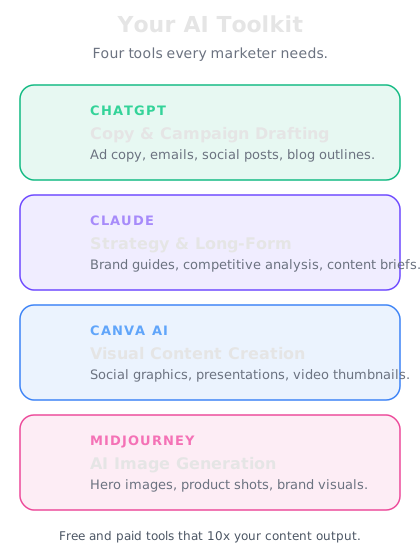
A visual map of AI marketing tools organized by function
Your AI toolkit should cover four pillars — copy, visuals, research, and analytics.

The core AI tools for marketers

ChatGPT (OpenAI) — Your all-purpose marketing assistant. Best for writing ad copy, brainstorming campaign ideas, drafting email sequences, analyzing data, and building content calendars. The Projects feature lets you upload your brand guidelines so every output stays on-brand. Best for: copywriting, strategy, analysis.

Claude (Anthropic) — Excels at longer, more nuanced writing tasks like blog posts, whitepapers, and detailed content briefs. Claude handles large documents well, so it is ideal for reviewing competitor reports or summarizing research. Best for: long-form content, research synthesis, detailed analysis.

Canva AI (Magic Studio) — Generates social media graphics, presentation slides, and marketing visuals directly within Canva. Magic Write handles copy, Magic Design creates layouts, and the Background Remover cleans up product photos. Best for: visual content, social graphics, quick design work.

Midjourney — Creates high-quality, stylized images from text prompts. Useful for hero images, concept art for campaigns, and visual brainstorming when stock photos feel generic. Best for: unique campaign visuals, mood boards, creative concepts.

Choosing the right tool for the task

The key is matching each tool to what it does best rather than forcing one tool to do everything:

| Task | Best Tool | Why |

|------|-----------|-----|

| Write Facebook ad copy | ChatGPT | Fast, great at short-form with constraints |

| Draft a 2,000-word blog post | Claude | Stronger at long, structured content |

| Create an Instagram carousel | Canva AI | Design + copy in one workflow |

| Generate a unique hero image | Midjourney | Custom visuals no stock site can match |

| Analyze campaign CSV data | ChatGPT | Upload files and ask questions directly |

| Write an email drip sequence | ChatGPT or Claude | Both handle multi-step content well |

Start with one tool for copy (ChatGPT or Claude) and one for visuals (Canva AI). Add others as your needs grow. Trying to learn everything at once leads to using nothing consistently.

Knowledge Check
Which AI tool is best suited for creating social media graphics and visual marketing content?
A
ChatGPT
B
Midjourney
C
Canva AI (Magic Studio)
D
Claude
Canva AI combines design and copy tools in one workflow, making it the best choice for social media graphics, carousels, and marketing visuals. It integrates AI-powered design suggestions directly into the creation process.
🤖
ChatGPT
online
I'm a solo content manager handling blog, social, and email for a SaaS startup. I can only afford one AI tool. Which should I pick and how should I use it?
For a solo content manager covering blog, social, and email — **ChatGPT Plus is your best single investment.** Here is why: **Blog content:** Use Projects to upload your brand voice guide and product docs. Ask ChatGPT to outline posts, write drafts, and suggest SEO-friendly titles. You will cut first-draft time by 60-70%. **Social media:** Ask for a week of posts at once. Provide your tone, platform, and topic. ChatGPT generates hooks, body copy, and CTAs for each platform — LinkedIn, X, Instagram — in one prompt. **Email marketing:** Draft welcome sequences, nurture campaigns, and promotional emails. Paste your best-performing emails and ask for variations that maintain the same style. **Bonus uses:** - Analyze your Google Analytics or campaign data by uploading CSVs - Brainstorm campaign concepts and taglines - Repurpose blog posts into social threads and email content **My recommendation:** Start with ChatGPT Plus ($20/month). After 30 days, if you need better visuals, add Canva Pro ($13/month). That two-tool stack covers 95% of a solo marketer's needs.
↻ Replay conversation
Knowledge Check
What is the recommended approach when building your AI marketing toolkit?
A
Subscribe to every AI tool available to maximize capabilities
B
Only use free tools to minimize costs
C
Start with 1-2 core tools and add more as your needs grow
D
Wait until one tool can do everything before adopting any AI
The most effective approach is starting with one tool for copy and one for visuals, then expanding as your needs grow. Trying to learn too many tools at once usually leads to inconsistent use and wasted subscriptions.
Knowledge Check
Which tool is generally best for long-form content like whitepapers and detailed blog posts?
A
Canva AI
B
Claude, which excels at longer, nuanced writing
C
ChatGPT is always the best choice for any writing task
D
Midjourney
Claude is particularly strong at longer, more structured writing tasks like whitepapers, blog posts, and research summaries. While ChatGPT is excellent for shorter copy and quick tasks, Claude often produces more nuanced long-form content.
🧰
Day 2 Complete
"You only need 2-3 AI tools to cover most marketing tasks. Start with ChatGPT or Claude for copy, Canva AI for visuals, and expand from there as your workflow demands."
Tomorrow — Day 3
Writing Ad Copy That Converts
Learn how to use AI to write headlines, CTAs, and benefit-driven ad copy that actually converts — plus how to generate A/B test variants instantly.
🔥1
1 day streak!