Creating Your VPS Instance
You have picked a provider. Now it is time to actually create your server. This lesson walks you through the process step by step. The screenshots may look slightly different depending on which provider you chose, but the concepts are identical everywhere: choose an operating system, pick a size, select a region, and click Create.
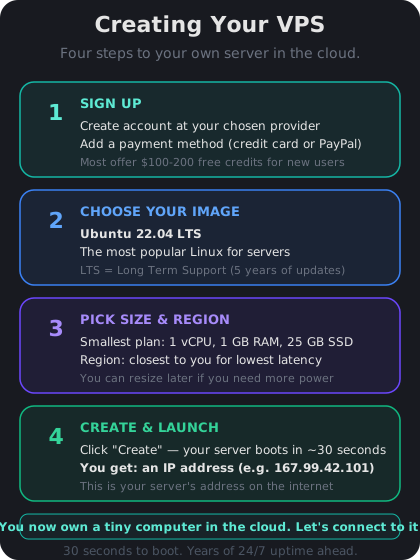
Step-by-Step Walkthrough
Follow these steps on your chosen provider's website:
1. Sign up — create an account with your email. Most providers ask for a payment method (credit card or PayPal). You will only be charged for what you use.
2. Create a new server — look for a button labeled "Create Droplet" (DigitalOcean), "Create Server" (Hetzner), or "Create Linode" (Linode).
3. Choose Ubuntu 22.04 LTS as your operating system. LTS stands for Long Term Support, which means it gets security updates for five years. This is the most widely supported Linux distribution and the one we will use throughout this course.
4. Pick the smallest plan — the $4-6/month tier with 1 vCPU and 1 GB RAM.
5. Select a region — choose the data center closest to you.
6. Set authentication — for now, choose "Password" and create a strong root password. We will switch to SSH keys in the next lesson.
7. Click Create and wait 30-60 seconds.
That is it. Your server is now running somewhere in a data center, waiting for you to connect.
What You Get — Your Server's IP Address
Once the server is created, the provider will show you an IP address. It looks something like `164.92.105.47`. This string of numbers is your server's address on the internet — like a phone number for your tiny cloud computer.
Write this IP address down. You will use it every time you connect to your server. Most providers also send it to your email as a confirmation.
Your VPS is now a real computer running Ubuntu Linux, sitting in a rack in a data center, connected to the internet 24/7. It has no monitor, no keyboard, and no mouse. You control it entirely by typing commands from your own computer — which is exactly what you will learn to do starting tomorrow.
Common Mistakes to Avoid
A few things beginners often get wrong at this stage:
- Choosing a non-LTS release — versions like Ubuntu 23.10 have shorter support windows and fewer tutorials. Stick with 22.04 LTS.
- Picking a region far away — if you are in New York, do not pick a Singapore data center. Every interaction will feel sluggish.
- Forgetting the root password — if you chose password authentication, save the password in a password manager immediately. You will need it to log in for the first time.
- Creating multiple servers — you only need one. Each server costs money, so delete any accidental extras from your dashboard.