SSH Keys & Secure Login
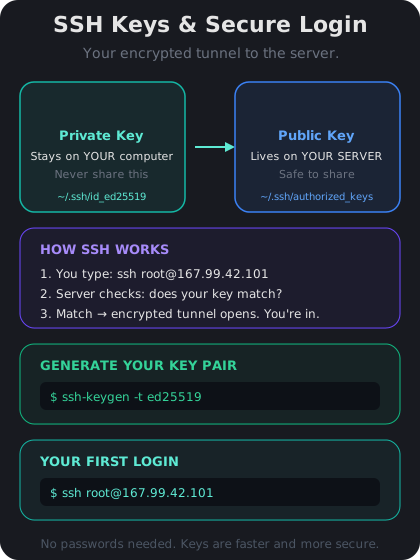
Your server is running. Now you need a way to control it. Since your VPS has no screen or keyboard, you connect to it over the internet using SSH (Secure Shell). Think of SSH as an encrypted tunnel between your computer and your server — everything you type travels through that tunnel safely, invisible to anyone listening.
Your First Login with a Password
If you set a root password when creating your VPS, you can log in right now. Open a terminal on your computer (Terminal on Mac/Linux, PowerShell on Windows) and type:
`ssh root@YOUR_IP_ADDRESS`
Replace `YOUR_IP_ADDRESS` with the IP from yesterday. Type `yes` when asked about the fingerprint, then enter your password. You are now controlling your server. Everything you type runs on the server, not on your laptop.
To disconnect, type `exit` and press Enter.
Upgrading to SSH Keys (Much Safer)
Passwords can be guessed. SSH keys cannot. A key pair consists of two files:
- Private key — stays on your computer. Never share it.
- Public key — gets copied to your server. It is safe to share.
When you connect, your computer proves it has the private key without ever sending it. Here is how to set it up:
1. Generate a key pair on your own computer: `ssh-keygen -t ed25519 -C "your@email.com"`. Press Enter to accept the default file location, then set a passphrase (or leave it empty).
2. Copy the public key to your server: `ssh-copy-id root@YOUR_IP_ADDRESS`. Enter your password one last time.
3. Test it — run `ssh root@YOUR_IP_ADDRESS` again. This time it should log you in without asking for a password.
From now on, only someone with your private key file can access your server. Tomorrow we will also disable password login entirely for maximum security.